Setting a color to your text
2010-03-09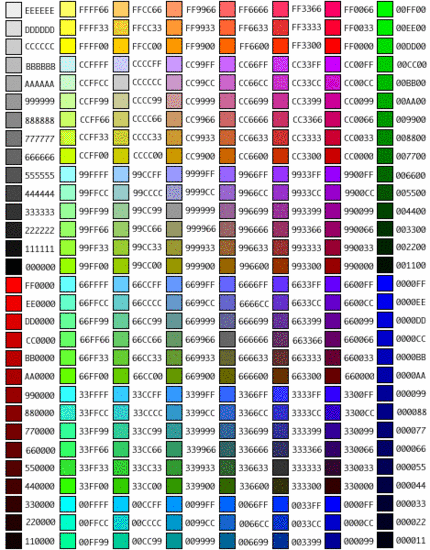
When you wish to set a color to your test, you need to know the HTML trick.
THIS IS RED
To change the color to red, you need to pu following tag in front of the text string.
<font color="#FF0000">
to end the color, you need to place
</font>
To turn text to red you write
<font color="#FF0000">THIS IS RED</font>
What is "FF0000" mean?
It is broken in to three vales. In this case "FF" "00" "00". Each values represent "RED" "GREEN" "BLUE" (RGB). FF is the maximum value and 00 is the minimum value. So FF0000 means Max RED, No GREEN and BLUE.
On top you see some of the values you can set for your text.